Showing posts with label blogger template. Show all posts

Flowers 3 Column Blogger template-download

3 Column Flowers Classic blogger template:
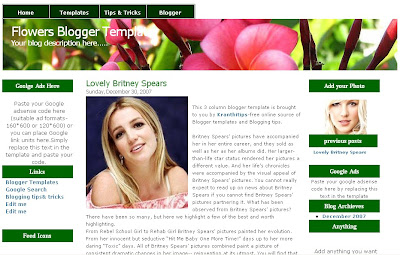
You can see the DEMO SITE HERE

Download this template


This is another beautiful looking 3 column classic blogger template.It has two sidebars and a navigation menu at the top,so looks Professional and highly custamisable.

How to install this template?
1.Sign in to your blogger dashboard>layout>edit html
2.Scroll down and click on the 'Revert to Classic Template' and click OK when the pop up window comes.
3.Replace the template code with the one you have downloaded.

Still can't understand? Here is the detailed description on HOW TO INSTALL A CLASSIC BLOGGER TEMPLATE [with screenshots]

More and more templates and blogging tips are coming........so, Subscribe to my Blog feed or Email subscription,so you won't miss them.
Please leave the comments if you like the template of if you have any questions,doubts regarding this template.
READ MORE - Flowers 3 Column Blogger template-download

Maroon 3 Column Blogger template -Download Now!

Maroon 3 Column Blogger template:

You can see the demo site here or download directly

Download template

Here is another 3 column blogger template for you guys.Two sidebars give the template extra flexibility than the two column templates.This is adsense supportive,ie..it is designed to provide you more space for your adsense units and you can manage them easily.

This is a Classic Blogger template guys.If you don't know how to install a classic blogger template in 'new blogger',Please read this.[I will show you how to install the classic blogger with screenshots]

If you like the template,please add the comments or if you have any doubts about installing the template,ask me.

More templates coming very very soon........Don't forget to subscribe to my rss feed or Email subscription inorder to don't miss it.

�Kranthitips-Your online source for Free Blogger templates


READ MORE - Maroon 3 Column Blogger template -Download Now!

Red Rise Classic Blogger(blogspot) Template

Red Rise Classic Blogger(blogspot) Template:

You can see the Demo Site Here

Download Template


This is a beautiful classic blogger template with two columns with one wonderful sidebar.
You can change the header image if you want,but the present header is not bad.
All the images in the template are hosted by photobucket.So,if bandwidth exceeds,you won't see images in the template.So,I added the images to the download file.After downloading the file,first upload the pictures to your own image server(I recommend Photobucket).

Note:This is a classic blogger template.If you are a new blogger,or you don't know how to install a classic blogger template,Please read this.

More Templates coming very very soon.Please,leave your comments here if you like the template or if you have any question about the template.Thanks.

Don't forget to Subscribe to my RSS Feed,so you don't miss the template.
READ MORE - Red Rise Classic Blogger(blogspot) Template

Beautiful 3 Column Blogger template-Download Now!

Blue Stars 3 Column Classic Blogger template

Click Here to See How it looks in your blog.....

Download Now!


Template Feautures:

  • 3 columns
  • Professional look
  • Navigation menu at the top
  • Beautiful looking Sidebars
  • Highly Custamisable
  • & many more...............
How to install this template?

Sign in to your blogger dashboard>Click on the 'layout' link>Edit html [see the screenshots below]


Next,Scroll down and click on the 'Revert to Classic Template' and Click on 'OK' when a pop up window comes.
Revert to classic template That's it,Replace template code with the downloaded template(the template is in the text file)and SAVE THE CHANGES.

Note:All the images in the template are hosted by Photobucket(Image hosting service)

This template is downloaded by hundreds of people.So,if my account bandwidth exceeds,the images may not show in your blog.So,I provided the images in your downloaded file.All you need to do is upload that images to your own image hosting server(like Photobucket,Imageshack.us).I recommend Photobucket).They provide direct links for the images.After uploading your images,replace the image links in the template with your own image links(given to you by photobucket).

For example,I uploaded the header image to photobucket and the direct link for that image is

http://i219.photobucket.com/albums/cc286/7kranthiswaroop/stars_1c.jpg

After,you uploaded the image to your own server,they will give you a link like

http..........................jpg, Simply replace the above url with your own url.

Search the image url's in the template(the one's starting with http and ending with jpg) and replace them.

-Thanks guys for your support....

�Blogger Tricks

READ MORE - Beautiful 3 Column Blogger template-Download Now!
 

Support By Blogger
