How to Show Blogger Links,Widgets in HomePage Only or Post Page Only

This post explains how to show the Blogger widgets( like links,adsense ads,etc) on your blogspot blog Homepage Only or Post Page Only:

Usually, by default.. when we add a widget item like link units, profile, Archives, Adsense ads,Pictures,etc in Blogger blog , it will be displayed in every page of the blog including the homepage, Permalink pages,etc. As you can see, I installed many widgets in this blog in sidebars like Google ads, Donate Me button ,etc which will be displayed in all the pages of the blog.
But, what if you want to display a specific widget like a blog link,ads in only the homepage and not in the post pages and viceversa? If you want to do so, this tip will come in handy...

HOMEPAGE Only widgets,links in Blogger:

? As usual, if you want to add a new widget/gadget to your blog, just Sign into Blogger dashboard � Layout � Add a Gadget
and select the type of gadget you need and Save the Changes.

Next, we have to add a small piece of code to that widget, so.. it only displays in the Homepage. Just go to Edit html and tick on the 'Expand Widget Templates'.
Notes: Normally, the widgets in the template view starts with this one

<b:widget id=


For example, The label widget looks something like this:

<b:widget id='Label1' locked='false' title='Title' type='Label'>


and html widget looks like:

<b:widget id='HTML1' locked='false' title='' type='HTML'>


and link list looks like this:


<b:widget id='LinkList2' locked='false' title='Title' type='LinkList'>


(If you want to know exactly what the widget id you need to change, just go to your blog and view the source code and find it.
In Firefox : View � Page Source
In IE : View � Source )

Just below that widget id link, You can see a b:includable tag like this..


<b:includable id='main'>


At this point, most of the task is completed.. Just we have to add a small piece of code below that b:includable tag..

the code is

<b:if cond='data:blog.url == data:blog.homepageUrl'>

and the last thing is, we have to close that b:if tag. Just add this code before the closing tag of b:includable.
Like this:

</b:if>
</b:includable>


So, the final code looks similar like the below screenshot:
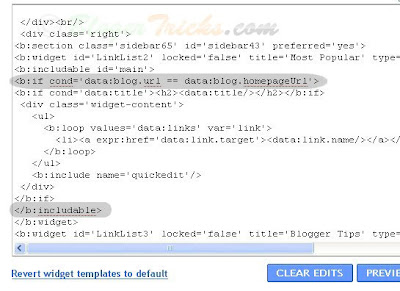
Finally it looks something like this
That's it! and Don't forget to Save the Changes.
Now, your desired widget/gadget can only be visible in Homepage.

Showing in only Post Pages (Permalink pages):

This will allow you to show a specific widget in only the Post Pages and not in the Homepage.
Just follow the same tutorial above but replace this code.

<b:if cond='data:blog.url == data:blog.homepageUrl'>


with this one:


<b:if cond='data:blog.pageType == "item"'>


Showing Widgets on a Specific Blog Post url:

If you want to dispaly a specific widget on on a particular blog post, just simply follow the above tutorial, but replace this code:


<b:if cond='data:blog.url == data:blog.homepageUrl'>


with this one:


<b:if cond='data:blog.url == "Blog Post URL"'>


That's it!
Like this post or have any questions? Comment here..

� Blogger Tricks


READ MORE - How to Show Blogger Links,Widgets in HomePage Only or Post Page Only

Sherweb: The most trusted name in Exchange Hosting


Sherweb is a name to reckon with when it comes to exchange hosting and web hosting. Organizations and companies can stand to immensely benefit from Sherweb, because it has excellent systems, manpower and tools in place to manage your email and web operations. This helps eliminate the need of having an email or web infrastructure, which means you make a drastic reduction in costs, while paving way for bigger profit margins.

The Exchange hosting solutions offered by Sherweb comes with �Hosted Exchange 2007� which gives you 3 GB of storage per mailbox at just $8.95 per month. It also has a high quality anti-spam solution that removes 98 percent of all junk messages. Along with the 3 GB storage per mail box, you also get features like advanced anti-virus filtering, free mobile synchronization, free copy of Outlook 2007 and free Sharepoint. With Sharepoint, various sets of teams in your company can collaborate together on a project or manage meetings from one place.

The Sharepoint Web Hosting is easily the best in the business with unlimited bandwidth and 99.99 percent uptime, daily backups and totally free tech support. There are three plans here, Starter Hosting, Expert Hosting and Premium Hosting. While Starter Hosting gives you 1 GB web space at $7.25 per month, Expert Hosting comes for $14.95 per month and gives you 10 GB of web space. The Premium Hosting gives you 20 GB of web space and comes for $28.95 per month.

Hosted Sharepoint is ideal for empowering small and medium businesses online. Hosted Sharepoint helps you to access Sharepoint services hosted at Sherweb. Here you get a strong, flexible platform with features and functionalities that can make it easy for teams in your organization to communicate, co-ordinate and work together with remarkable ease. Hosted Sharepoint has four types of products on the offer for unlimited users: Sharepoint 200 MB ($8.95 per month), Sharepoint 2 GB($19.95 per month), Sharepoint 10 GB($59.95 per month) and Sharepoint 50 GB($139.95 per month). All the four have features like project collaboration, document sharing and mobile access.
Sherweb has a rich experience of over 9 years to its credit. It is a Microsoft Gold Certified Partner and also has a service provider licensing agreement (SPLA) with them. It is also a Blackberry Alliance member. There are no hidden charges or fees in any of their products. Low price and high quality performance products are guaranteed at Sherweb.
READ MORE - Sherweb: The most trusted name in Exchange Hosting

Press Release strategies by Keyword Performance helps you stay in news!


We all know how indispensable Search Engine Optimization is, if we want to ensure high traffic or readership to our website. Most web businesses that use SEO skills properly earn higher profit margins, become highly popular and get dedicated traffic by the targeted customer or reader base. The pioneering company Keyword Performance LLC is a search engine optimization company that builds and develops web strategies in the form of keyword placement and optimization that are easily tracked by major search engines, continually. Among many services that Keyword Performance LLC offers like content development services, SEO services, internet marketing, video SEO, Pay Per Click advertising, etc; Press Release Services also forms a major part of their SEO strategy.

A press release is an important tool that comes handy when you have to talk about the launch of a new product, service or inform them about a change or addition of extra features for your product or service. The press release services offered by Keyword Performance LLC create press releases that can be read by a target audience, by incorporating sound SEO techniques. The press release writers at Keyword Performance LLC are adept and highly talented at their work, be it at headline creation or professional writing with the right �hooks� to keep the reader interested in knowing more about your product or service.

Keyword Performance LLC helps you break the news in the most appropriate and effective manner, as it works with the most formidable press release and distribution channels online, that can make the news available to be accessed and read by a legion of online readers who can link back to your website. Your website will find visibility in the best web news channels, including MSN, Yahoo and Google. So trust the press release feature of Keyword Performance LLC for quality back links, increased traffic and dedicated readership to your website.
READ MORE - Press Release strategies by Keyword Performance helps you stay in news!

Contest on BloggerTricks.com - Win $100 Cash - Paypal

Update : 25- March 2009
Contest Ended.. Check out the Winners!
-------------------------------------------------------
Yes.. If you didn't yet know about our First contest for $100 cash prize, check this out!


Yes folks.. I'm really excited to announce our very first Contest here at BloggerTricks.com.
OK.. straight to the details..

The Sponsors:
The prize comes courtesy of these people:

HomeImprovementCorner.com - Home Improvement Contractors
Banner-ad-blog.com - Banner Ad Blog & Directory

Here are the Prizes:
1st Place : $50 hard cash

2nd Place : $25

3rd Place: $15

4th, 5th & 6th Places : $5 each

(yea.. total of 6 prizes.. so, you can have more chances of winning)

The winner will not be determined by a random draw like most other contests. Luck plays no role here. The winners will be determined based on the most number of points they get before the dead line March 25th.


How to get Points ?
Simple! There are lot of ways to earn points.
1. Just leave a comment here (max 1 comment per person)
Points you get : 2

2. Digg this Post:
You can digg this post here.
Points : 3

3. Blog about this Contest :
Just spread the word by writing a small review about this contest (min 100 words) in your blog including a link to this contest page and a link each to both of the contest sponsors.
Points : 15 x your blog's Pagerank
Ex: If your Blog's Pagerank is 3 , you get 45 pts .
(Note: 10 pts if the Pagerank is Zero).
1 Post max per blog. So, the more blogs you have, the more points you can get.
And, we don't accept newly created blogs or blogs with less contest to avoid creation of new blogs just for the sole purpose of this contest. And the reviews must be in your own words.. not just copy - paste.

4. Add a small banner in your blog about this contest.
Just copy this html code and paste it in your blog sidebar...
*max 1 per blog
Points : 10
Participate in BloggerTricks.com Contest and Win $100


<a href="http://bloggertricks.com/2009/03/contest-on-bloggertrickscom-win-100.html" target="_blank"><img src="http://i41.tinypic.com/105yy9x.jpg" alt="Participate in BloggerTricks.com Contest and Win $100" width="125" height="125" border="0" /></a>


5. Subscribe to our Email newsletter: You can subscribe here.
*Max 1 per person
let me know with your email if you have already subscribed.
Points : 10

Make Your Entries Official:
The last thing you have to do is make your entries official by leaving a comment here below this post with your name and Blog url. So, it's easy for us to track your points.

Once again, the deadline for this contest is March 25th.

Note : Winners should have a Paypal account to transfer the money.
*First come - First Win : If participants ended with same points, the winner will be chosen based on the First come - First win basis.

Good luck to all!


READ MORE - Contest on BloggerTricks.com - Win $100 Cash - Paypal

Paypal Indian Bank withdrawal Problem - Payments Not Processed

There are reports all over the web complaining that the Paypal withdrawals to Indian Bank accounts between Feb 19 to Feb 24 are not being processed.
I myself made a withdrawl on Feb 27th which is not yet completed.

Paypal Indian Bank withdrawal Problem - Payments Not Processed
Electronic transfers to your Bank account usually take 5-7 business days to process. Holidays and weekends are not recognized as business days for most banking facilities, which may result in a delay in your banking transactions.
Usually, for me it takes about 2 business days to get the money.. but this time it is not yet completed even on the seventh day.

What about you guys ? Did you experienced any problems with Paypal withdrawl recently? If you got any success in the transaction, please do comment here because the information can be helpful to many other Paypal users with this problem.
READ MORE - Paypal Indian Bank withdrawal Problem - Payments Not Processed

Another 3 Column Blogger Template "Hot Coffee"

Hello guys.. I'm back again! Sorry for not updating the blog frequently as I'm busy preparing for the exams.. Anyways.. here is my latest Wordpress to Blogger conversion.. "Hot Coffee". The template is 3 columns with two sidebars on the right side. The template suits well for blogs related to foods,drinks,cooking,etc..

Look at the screenshot:

HotCoffee Blogger Template screenshot


Template Installation:

(Before uploading any new template, backup your current template first)

1. After downloading the template, extract the file using winzip or winrar. Sign in to Blogger and go to Layout � Edit html
and upload the downloaded xml file using the Upload button and Save the Changes.

Editing the Top Navigation Links:

navlinksAfter installing the template, you can edit the top navigation links to your desired links.. Just search for this code in the template ( Ctrl+F to search)


<li><a href='#'>About</a></li>

<li><a href='#'>Resources</a></li>

<li><a href='#'>Contact</a></li>


and SAVE THE CHANGES.

Installing "Hot Coffee" Blogger Template - Video Tutorial:


READ MORE - Another 3 Column Blogger Template "Hot Coffee"

BloggersBase: A Winsome opportunity for Bloggers

Bloggersbase
Getting a steady stream of traffic to your blog requires a mix of effective, interesting content and some skilled marketing. One of the best ways is to network with other blogs that deal in the same kind of topics that you expertise in. Yes, you are right, we are talking about niche blogs. There are sites like Digg, Stumble-Upon, Delicious etc that are giants in social media network, where bloggers play the field, posting their content and rating others� who write on similar topics. But therein lies a problem. Since these sites have huge viewership, you can expect sites, blogs and people who have accumulated a steady network of readers over a period of time, to get the most hits and traffic.

Bloggersbase
It is not difficult to see a web portal getting more readers than your blog in social media network sites, just because the former is a recognized name in the web business. There are also days when you may get a steady line-up of traffic because of one particular news item that you have written, only to find readership trickling the next day. How can we make sure that we have a continual supply of massive readership or viewership to our site? How can those who are new to blogging or those who do not have the clout of the market leaders, get a high amount of traffic to their site? There is a way to climb the ladder of utmost popularity in your niche and earn continual traffic from the fastest growing online citizen journalism magazine called Bloggers Base. Learn what BloggersBase is all about.


By virtue of Bloggers Base, you get an opportunity of making your own network consisting of like-minded people who are interested in the information or story that your provide. The key to earn money from your blog through Bloggers Base is by leveraging the network of readers that visit your blog. In simple words, your blog thrives on patronage of people who become dedicated fans of your blog. Isn�t it fascinating to have a major amount of readers being loyal to your blog, coming in to check every time what is the latest bit of news or information that you have added? Get discovered and monetize your talent.

The other good thing is that B logger Base does not maintain exclusivity. You do not have to publish all your posts in Bloggers Base and neglect your personal blog. You can link your posts and profile to the blogs or site that you want. You have a high chance of leveraging your network of readers by rating a post or commenting on their blogs. There are special promotional awards also given regularly to the most talented and dedicated users. There is also an affiliate program in place where you can refer bloggers to Bloggers Base through your site, and earn prizes. Make money, win Prizes and Awards.
READ MORE - BloggersBase: A Winsome opportunity for Bloggers
 

Support By Blogger