
One of the reasons why so many people are switching to wordpress from Blogger is for the Comment form.The Blogger comment form sucks as people have to click on 'add a comment' then redirect to blogger and posting the comment... and most of the people are too lazy to do it (atleast myself).But, here is the good news...Blogger released this most awaited feature a couple of days ago... and let's learn how to add this to your Blogger blog (this works both for new blogger and classic blogger)here is the screenshot of how it looks: Learn how to add this to your blog..1.First Sign in to Blogger Draft and select your blog and click on the Settings
 2.Next, Click on the "Comments tab"
 and select the "Embedded below post" option
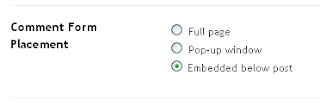 and Finally Save the changes..that's it! I know most of you want to add this new feature to your blog as soon as you can...
READ MORE - How to add Inline Comment Form under each blog post in Blogger

 2.Next, Click on the "Comments tab"
 and select the "Embedded below post" option
 and Finally Save the changes..that's it! I know most of you want to add this new feature to your blog as soon as you can...


