
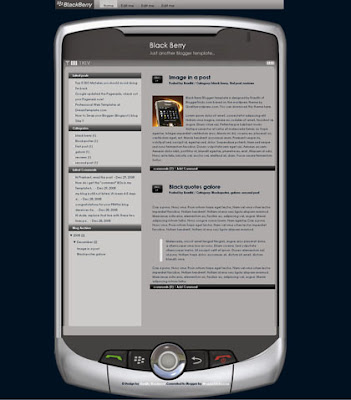
Here again guys, I'm back with another professional Blogger template "Blackberry". The template is two columns and very well suits for mobile,tech related sites. This was originally a wordpress theme by QualityWordpress.com. I converted it into Blogger xml format for you guys!
Take a look at the screenshot:
Template Installation Instructions:
1.First, download and install the template following these basic installation steps.
2.Now, go to Layout � Edit html and scroll down the template and find these lines and edit the links with your desired ones.


and Save the Changes... that's it!
READ MORE - Blackberry Blogger Template - Mobile,tech niche template
Take a look at the screenshot:

Template Installation Instructions:
1.First, download and install the template following these basic installation steps.
2.Now, go to Layout � Edit html and scroll down the template and find these lines and edit the links with your desired ones.

<div id='header-menu'>
<ul>
<li class='current_page_item'><a href='http://blogger.com'>Blogger</a></li>
<li class='page_item page-item-2'><a href='http://bloggertricks.com'>Blogger Templates </a></li>
<li class='page_item page-item-3'><a href='http://google.com'>Google</a></li>
<li class='page_item page-item-4'><a href='http://gmail.com'>Gmail</a></li>
</ul>
</div>

and Save the Changes... that's it!


